For those of you using SmoothBoard, here is an interesting little tip:
If you have access to two ir pens, you can draw perfectly straight lines between them.
Go to annotation mode and select a pen colour. Then position each pen where you want the ends of the line to be and activate them. SmoothBoard will magically draw a perfect line between the two points. Very handy if your hand drawn lines look a bit 'wobbly' at times!
Showing posts with label smoothboard. Show all posts
Showing posts with label smoothboard. Show all posts
Wednesday, February 10, 2010

Friday, February 5, 2010
Setting up the 3Pi Classroom Kit - Part 3
Now that all the components are in place it is time to complete the last installation step.
All 3Pi kits contain a licenced copy of SmoothBoard as it is simply the best available software.
SmoothBoard connects to your computer through standard MicroSoft Bluetooth. As many computers come with another type of Bluetooth (or none at all ) we supply a small USB Bluetooth dongle in our kits.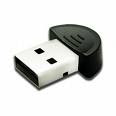 We give instructions on how to disable any preinstalled Bluetooth. After following them, you plug the dongle into any spare USB port and it installs itself using the MS Bluetooth.
 We give instructions on how to disable any preinstalled Bluetooth. After following them, you plug the dongle into any spare USB port and it installs itself using the MS Bluetooth.
Now install SmoothBoard (full instructions given), and start it up. The programme will show a screen like this as it searches for the wiimote.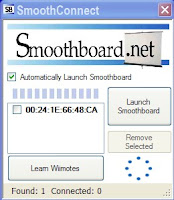

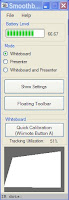
When you see this screen, push our remote synch button in for a couple of seconds and release it. You will see the four blue lights on the end of the wiimote start to flash which shows it is in 'discovery mode'. They will keep flashing for 20 seconds. If your computer is slow, they may stop flashing before the connection is made. If this happens, simply press the button again. SmoothBoard will find the wiimote and connect to it. The first time you do this it may take a little while for the wiimote to be found, but after that it gets much quicker. When it is properly connected you will see this.

Now click on "Quick Calibration". A circle with a cross in it will appear in the top left hand corner of the screen. Take your pen and touch it to the middle of the cross. It will disappear and another one should appear in the next corner. You then repeat the action - there are four in total. If you are unable to make any of the crosses disappear, the wiimote is not pointing in the middle of the screen. Slightly adjust it and try again. When calibrated, you can start interacting!

Saturday, January 16, 2010
SmoothBoard Software
 As you will be aware, 3Pi fully endorses the excellent SmoothBoard software created by Boon Jin. He has created a product that is light years ahead of the early demonstration software that Johnny Lee Chung started this whole system off with two years ago.
The latest version (SmoothBoard 1.6) is as easy to use as any of the other, much more expensive, commercial offerings. The user simply clicks on a desktop icon, and if they have a 3Pi kit, pushes the synch button. That is all.
Our next few posts will give a simple 'walk through' on how to set up one of the 3Pi kits.
Saturday, September 12, 2009
SmoothBoard 1.6 is Awesome!
 We are continually impressed with the work of Boon Jin and his latest version of the SmoothBoard software is no exception! SmoothBoard 1.6 comes with an outstanding feature that he has called 'SmoothConnect'. Once installed, all the user has to do is click on the desktop icon, put the wiimote in discoverable mode, and the software does all the rest. This feature moves the whole wiimote interactive whiteboard system onto an equal footing with other commercial products.
The only catch is that SmoothConnect is configured to work with standard Microsoft Bluetooth. Boon Jin has done this because of the very wide range of Bluetooth software in the market which all have their own particular requirements. The easiest way to ensure your computer is using the Microsoft version, if you're a 'non-techy' user, is to simply plug in a small Bluetooth dongle (pictured above) and let Windows find and install it (sorry Mac users, SmoothBoard and SmoothConnect are written for Windows based computers). 3pi can supply you with a dongle that will work or you can source your own. We are so impressed with this new development that we are now going to add a dongle to our kits so that customers can have the simplest software solution possible. (Our kits include a licensed copy of SmoothBoard with SmoothConnect.)
Thursday, July 9, 2009
Calibrating
 If you haven't looked at the Smoothboard calibration assistant you should.
The white area in the screenshot shows the calibrated area (in this case 54% )and the black area shows the wiimote's possible tracking area. This visual tool is very handy when first learning to setup the system as you can experiment with different wiimote positions until you get a reliable tracking result - it removes the guess work! In practice, we find that tracking over 30% is sufficient to give reliable results.
Friday, June 19, 2009
One or two Wiimotes?
We are sometimes asked whether we recommend one or two wiimotes for the best tracking performance. As you probably know, Smoothboard www.smoothboard.com has the capability to use two wiimotes if you wish.
Well, we ourselves only use one. If properly positioned, either temporarily, or using a mount system such as in our classroom kit, it is very rare for the wiimote not to be able to 'see' the pen. Of course, if you want to try the two wiimote option, it is still a relatively inexpensive setup. We'd love to hear from users who do think the second wiimote is useful as if there was enough demand, we could provide that option in our kits.
Well, we ourselves only use one. If properly positioned, either temporarily, or using a mount system such as in our classroom kit, it is very rare for the wiimote not to be able to 'see' the pen. Of course, if you want to try the two wiimote option, it is still a relatively inexpensive setup. We'd love to hear from users who do think the second wiimote is useful as if there was enough demand, we could provide that option in our kits.
Subscribe to:
Posts (Atom)